
2025 Karnataka Citizen Safety Guide: Spot Fake Police Apps, Deepfake Calls & Digital Scams
December 6, 2025
Ashok Kamat
2025 Karnataka Citizen Safety Guide: Spot Fake Police Apps, Deepfake Calls & Digital Scams
December 6, 2025
Ashok Kamat
Immediate Help (If You Need a Quick Answer) If you received a suspicious app, message, police call, KYC request, ad, link, document, or digital ID, stay calm — you’re not alone. Even tech-savvy people get targeted daily. Send it to us privately for verification: • Email: contact@cybersecify.com • WhatsApp/Call: +91 99869 98333 You’ll receive a free legitimacy check as soon as possible — urgent cases are prioritised. You only pay if deeper investigation is required. Tip: Save our WhatsApp number now: +91 99869 98333 During emergencies, you won’t have time to search.
10-Second Verification Checklist
Use this when something feels “off” and you must decide quickly:
Publisher must be: Karnataka State Police / Government of Karnataka
Links must end with: .gov.in or .nic.in
Permissions should NOT include: microphone, contacts, file access, payments
Google Ads can be fake — always scroll past ads
Never join video calls claiming to be police
If anything feels unusual: stop → verify → then act.
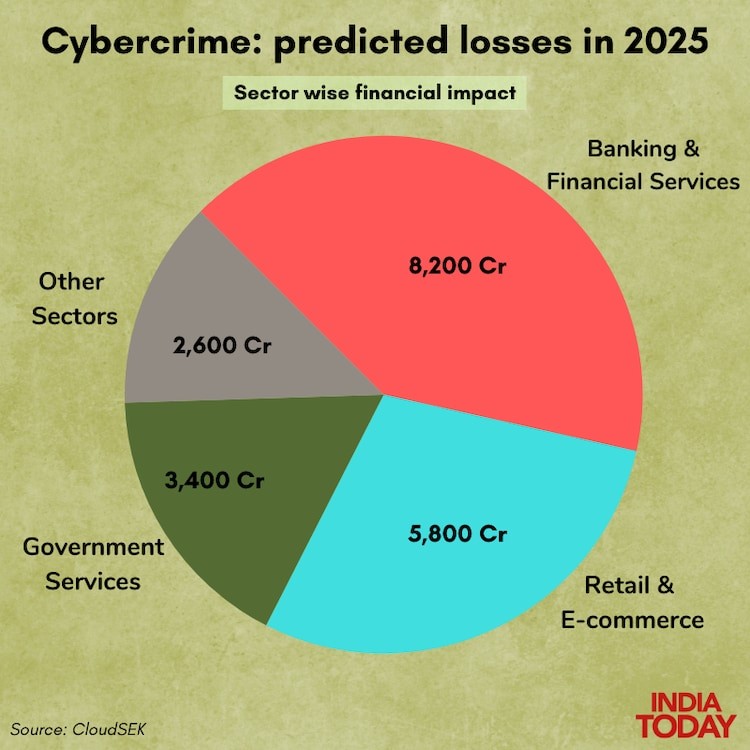
TL;DR (Should You Read This?)
Fake police apps, cloned government websites, fake helpline ads, and AI-generated police calls are rising sharply across Karnataka.
This guide shows you:
The real Karnataka Police apps
How scammers clone apps and run fake ads
How to detect scams in under 10 seconds
What to do if you interacted with a suspicious caller/app
How to get a free legitimacy check from Cyber Secify
If you live in Karnataka or have family/friends here, this guide can prevent major financial and privacy damage.
Why This Guide Matters
Karnataka is experiencing a surge in digital impersonation crimes. Scammers now use:
Fake police apps
Deepfake video calls
Spoofed caller IDs
Google Ads impersonating the government
Fake verification portals
WhatsApp “FIR” threats
AI-generated police voices
Below are two real scam patterns affecting Bengaluru residents today.
Incident 1 — Fake KYC Verification / Fake App Scam
A Bengaluru resident searched “KYC update” on Google.
The top result — a sponsored ad — led to a fake app that looked fully legitimate.
Once installed, the app:
Showed a professional UI
Displayed fake “verified” badges
Asked for PAN, Aadhaar, and contact sync
Requested “small test deposits”
Threatened account freeze
Within minutes:
Money was siphoned
Contacts were harvested
WhatsApp threats of “FIR filing” began
The scam relies on the same formula used in digital arrest scams:
credibility + urgency + authority + professional design.
Incident 2 — Digital Arrest Scam
In another case, scammers digitally “arrested” a Bengaluru resident using AI-generated voices.
The pattern:
Caller ID showed a spoofed “Police Helpline”
Victim told their Aadhaar or parcel was linked to a crime
Moved to a video call with someone in a fake uniform
Shown fabricated FIR PDFs and case files
Ordered to keep their camera on
Pressured to transfer money “for verification”
Scammers used:
AI-generated police voices
Deepfake video elements
Fake cybercrime websites
Spoofed police numbers
Fake case files and badges
Why This Guide Matters
Karnataka is experiencing a surge in digital impersonation crimes. Scammers now use:
Fake police apps
Deepfake video calls
Spoofed caller IDs
Google Ads impersonating the government
Fake verification portals
WhatsApp “FIR” threats
AI-generated police voices
Below are two real scam patterns affecting Bengaluru residents today.
Incident 1 — Fake KYC Verification / Fake App Scam
A Bengaluru resident searched “KYC update” on Google.
The top result — a sponsored ad — led to a fake app that looked fully legitimate.
Once installed, the app:
Showed a professional UI
Displayed fake “verified” badges
Asked for PAN, Aadhaar, and contact sync
Requested “small test deposits”
Threatened account freeze
Within minutes:
Money was siphoned
Contacts were harvested
WhatsApp threats of “FIR filing” began
The scam relies on the same formula used in digital arrest scams:
credibility + urgency + authority + professional design.
Incident 2 — Digital Arrest Scam
In another case, scammers digitally “arrested” a Bengaluru resident using AI-generated voices.
The pattern:
Caller ID showed a spoofed “Police Helpline”
Victim told their Aadhaar or parcel was linked to a crime
Moved to a video call with someone in a fake uniform
Shown fabricated FIR PDFs and case files
Ordered to keep their camera on
Pressured to transfer money “for verification”
Scammers used:
AI-generated police voices
Deepfake video elements
Fake cybercrime websites
Spoofed police numbers
Fake case files and badges
These scams are psychologically coercive. Even highly educated people fall for them.
Fake vs Genuine App — Quick Table
Fake App | Genuine App |
|---|---|
Found via ads | Found via official police/government sites |
Requests contacts/mic/file access | Only location + notifications |
Private publisher | Government publisher |
No update history | Regular updates |
Broken English reviews | Clear reviews from real users |
Shared as APK links | Only from official Play Store links |
This helps you avoid unsafe lookalikes.
Free First-Level Verification (Community Safety Initiative)
Cyber Secify provides free Level 1 legitimacy checks for:
Apps
Google/Instagram/Facebook ads
WhatsApp messages
Caller IDs & video calls
Screenshots
Websites & links
Digital ID cards
KYC requests
Police impersonation attempts
Level 2 (Paid Only If Needed):
Deepfake detection, network behaviour analysis, metadata analysis, OSINT profiling, document authenticity, website inspection.
Your safety first — payment only if deeper work is needed.
1. What Is the KSP App?
The genuine Karnataka State Police (KSP) app provides:
Emergency SOS
Women’s safety tools
Crime reporting
Staff/tenant verification
FIR & complaint tracking
Public safety alerts
SEO Note: The genuine KSP app download link is always found on the official Karnataka Police website.
Only download apps from official government publishers on Google Play.
2. Who Should Use the KSP App?
Women & students
Families & elderly
SMB owners & founders
Daily commuters
Cybercrime victims
3. Official Karnataka Police Apps (2025): Quick Comparison)
App Name | Purpose | Best For |
|---|---|---|
KSP AppCell | SOS, reporting, verification | All citizens |
Suraksha App (112) | Women’s emergency safety | Women & students |
Emergency SOS / Police Mitra | Immediate help | General public |
Citizen Services App | FIR copies, verification status | Households, SMBs |
4. How to Verify a Police App, Ad, Website, or Message
Always check:
Publisher Name — must be govt
Email Domain — @gov.in / @nic.in only
Permissions — avoid unnecessary access
Update History — outdated = risky
Source Link — must be gov domain
Official Announcements — KSP Twitter/X
Downloads & Reviews — low = danger
Fake Ads — often sponsored
Fake Calls — AI voice cloning is common
5. Key Features of the KSP App
Emergency SOS
Women’s safety tools
Crime reporting
Staff/tenant verification
Complaint/FIR tracking
Public advisories
6. AI Impersonation & Deepfake Risks
Scammers now impersonate:
Police
Government officials
Bank representatives
Cybercrime authorities
Cyber Secify helps verify:
Caller authenticity
Deepfake video/voice
App/site legitimacy
Document tampering
7. If You Suspect a Fake App, Message, or Call — Do This
Do not uninstall the app
Disconnect the internet
Stop responding
Capture screenshots/recordings
Do NOT share Aadhaar, PAN, OTP
Send it to Cyber Secify via Email: contact@cybersecify.com or WhatsApp/Call: +91 99869 98333
If confirmed fake → report on cybercrime.gov.in
8. Protect Your Family & Friends
Victims include:
Parents
Elders
Non-tech users
Tech users too
Give them these rules:
Never install apps from ads
Never join police video calls
Never share OTP or Aadhaar
Never send money “for verification”
Never click on links from unknown numbers
Always contact you or Cyber Secify before acting
9. Evidence to Collect Before Reporting (Very Important)
If you interacted with scammers, collect:
Screenshots
Caller ID
Call recordings
App permissions
URLs or links
Transaction IDs
Chat history
Fake documents
This makes reporting faster and improves recovery chances.
10. How the KSP App Strengthens Karnataka’s Safety Ecosystem
Reduces police station visits
Simplifies reporting
Helps victims take correct steps
Supports SMBs
Improves statewide digital + physical safety
11. Cyber Secify’s Role in Public & Digital Safety
We help citizens and businesses through:
Grey-Box Penetration Testing (AI Apps, Web, API & more)
Security Consulting
Privacy Advisory
OSINT for key individuals
Cybercrime victim support
Digital Incident Response
Safety awareness training
Our mission: Keep Karnataka safe — physically and digitally.
Final Thoughts
Karnataka’s digital policing systems are strong — but scammers now exploit AI, impersonation, and cloned apps to target residents daily.
Verification is now a life-saving habit.
If something feels unusual: verify first — trust later.
Need Help? Contact Cyber Secify
🌐 https://cybersecify.com
📞 +91 99869 98333
📧 contact@cybersecify.com
📍 Bengaluru, India
Free Legitimacy Check: apps, ads, callers, websites, documents.
Advanced Investigation: paid only if deeper analysis is required.
Resources
Official Police & Government Sources
Karnataka State Police – https://ksp.karnataka.gov.in
Bengaluru City Police – https://bcp.karnataka.gov.in
112 Emergency Response – https://112.gov.in
KSP Public Services – https://ksp.karnataka.gov.in/page/Services/en
Karnataka Police Scam Alerts
Bengaluru City Police Alerts – https://twitter.com/blrcitypolice
Karnataka CID Cyber Crime – https://cybercrime.karnataka.gov.in
National Cybercrime Portal – https://cybercrime.gov.in
CERT-In Advisories
Fake Govt Apps – https://www.cert-in.org.in
Deepfake Advisory – https://www.cert-in.org.in/s2cMainServlet?pageid=PUBSCADVISORY01
Disclaimer
This guide is for public awareness only. Cyber Secify is an independent cybersecurity consultancy and is not affiliated with or endorsed by the Karnataka Police or any government department. For emergencies or legal reporting, always contact official authorities.
10-Second Verification Checklist
Use this when something feels “off” and you must decide quickly:
Publisher must be: Karnataka State Police / Government of Karnataka
Links must end with: .gov.in or .nic.in
Permissions should NOT include: microphone, contacts, file access, payments
Google Ads can be fake — always scroll past ads
Never join video calls claiming to be police
If anything feels unusual: stop → verify → then act.
TL;DR (Should You Read This?)
Fake police apps, cloned government websites, fake helpline ads, and AI-generated police calls are rising sharply across Karnataka.
This guide shows you:
The real Karnataka Police apps
How scammers clone apps and run fake ads
How to detect scams in under 10 seconds
What to do if you interacted with a suspicious caller/app
How to get a free legitimacy check from Cyber Secify
If you live in Karnataka or have family/friends here, this guide can prevent major financial and privacy damage.
Why This Guide Matters
Karnataka is experiencing a surge in digital impersonation crimes. Scammers now use:
Fake police apps
Deepfake video calls
Spoofed caller IDs
Google Ads impersonating the government
Fake verification portals
WhatsApp “FIR” threats
AI-generated police voices
Below are two real scam patterns affecting Bengaluru residents today.
Incident 1 — Fake KYC Verification / Fake App Scam
A Bengaluru resident searched “KYC update” on Google.
The top result — a sponsored ad — led to a fake app that looked fully legitimate.
Once installed, the app:
Showed a professional UI
Displayed fake “verified” badges
Asked for PAN, Aadhaar, and contact sync
Requested “small test deposits”
Threatened account freeze
Within minutes:
Money was siphoned
Contacts were harvested
WhatsApp threats of “FIR filing” began
The scam relies on the same formula used in digital arrest scams:
credibility + urgency + authority + professional design.
Incident 2 — Digital Arrest Scam
In another case, scammers digitally “arrested” a Bengaluru resident using AI-generated voices.
The pattern:
Caller ID showed a spoofed “Police Helpline”
Victim told their Aadhaar or parcel was linked to a crime
Moved to a video call with someone in a fake uniform
Shown fabricated FIR PDFs and case files
Ordered to keep their camera on
Pressured to transfer money “for verification”
Scammers used:
AI-generated police voices
Deepfake video elements
Fake cybercrime websites
Spoofed police numbers
Fake case files and badges
Why This Guide Matters
Karnataka is experiencing a surge in digital impersonation crimes. Scammers now use:
Fake police apps
Deepfake video calls
Spoofed caller IDs
Google Ads impersonating the government
Fake verification portals
WhatsApp “FIR” threats
AI-generated police voices
Below are two real scam patterns affecting Bengaluru residents today.
Incident 1 — Fake KYC Verification / Fake App Scam
A Bengaluru resident searched “KYC update” on Google.
The top result — a sponsored ad — led to a fake app that looked fully legitimate.
Once installed, the app:
Showed a professional UI
Displayed fake “verified” badges
Asked for PAN, Aadhaar, and contact sync
Requested “small test deposits”
Threatened account freeze
Within minutes:
Money was siphoned
Contacts were harvested
WhatsApp threats of “FIR filing” began
The scam relies on the same formula used in digital arrest scams:
credibility + urgency + authority + professional design.
Incident 2 — Digital Arrest Scam
In another case, scammers digitally “arrested” a Bengaluru resident using AI-generated voices.
The pattern:
Caller ID showed a spoofed “Police Helpline”
Victim told their Aadhaar or parcel was linked to a crime
Moved to a video call with someone in a fake uniform
Shown fabricated FIR PDFs and case files
Ordered to keep their camera on
Pressured to transfer money “for verification”
Scammers used:
AI-generated police voices
Deepfake video elements
Fake cybercrime websites
Spoofed police numbers
Fake case files and badges
These scams are psychologically coercive. Even highly educated people fall for them.
Fake vs Genuine App — Quick Table
Fake App | Genuine App |
|---|---|
Found via ads | Found via official police/government sites |
Requests contacts/mic/file access | Only location + notifications |
Private publisher | Government publisher |
No update history | Regular updates |
Broken English reviews | Clear reviews from real users |
Shared as APK links | Only from official Play Store links |
This helps you avoid unsafe lookalikes.
Free First-Level Verification (Community Safety Initiative)
Cyber Secify provides free Level 1 legitimacy checks for:
Apps
Google/Instagram/Facebook ads
WhatsApp messages
Caller IDs & video calls
Screenshots
Websites & links
Digital ID cards
KYC requests
Police impersonation attempts
Level 2 (Paid Only If Needed):
Deepfake detection, network behaviour analysis, metadata analysis, OSINT profiling, document authenticity, website inspection.
Your safety first — payment only if deeper work is needed.
1. What Is the KSP App?
The genuine Karnataka State Police (KSP) app provides:
Emergency SOS
Women’s safety tools
Crime reporting
Staff/tenant verification
FIR & complaint tracking
Public safety alerts
SEO Note: The genuine KSP app download link is always found on the official Karnataka Police website.
Only download apps from official government publishers on Google Play.
2. Who Should Use the KSP App?
Women & students
Families & elderly
SMB owners & founders
Daily commuters
Cybercrime victims
3. Official Karnataka Police Apps (2025): Quick Comparison)
App Name | Purpose | Best For |
|---|---|---|
KSP AppCell | SOS, reporting, verification | All citizens |
Suraksha App (112) | Women’s emergency safety | Women & students |
Emergency SOS / Police Mitra | Immediate help | General public |
Citizen Services App | FIR copies, verification status | Households, SMBs |
4. How to Verify a Police App, Ad, Website, or Message
Always check:
Publisher Name — must be govt
Email Domain — @gov.in / @nic.in only
Permissions — avoid unnecessary access
Update History — outdated = risky
Source Link — must be gov domain
Official Announcements — KSP Twitter/X
Downloads & Reviews — low = danger
Fake Ads — often sponsored
Fake Calls — AI voice cloning is common
5. Key Features of the KSP App
Emergency SOS
Women’s safety tools
Crime reporting
Staff/tenant verification
Complaint/FIR tracking
Public advisories
6. AI Impersonation & Deepfake Risks
Scammers now impersonate:
Police
Government officials
Bank representatives
Cybercrime authorities
Cyber Secify helps verify:
Caller authenticity
Deepfake video/voice
App/site legitimacy
Document tampering
7. If You Suspect a Fake App, Message, or Call — Do This
Do not uninstall the app
Disconnect the internet
Stop responding
Capture screenshots/recordings
Do NOT share Aadhaar, PAN, OTP
Send it to Cyber Secify via Email: contact@cybersecify.com or WhatsApp/Call: +91 99869 98333
If confirmed fake → report on cybercrime.gov.in
8. Protect Your Family & Friends
Victims include:
Parents
Elders
Non-tech users
Tech users too
Give them these rules:
Never install apps from ads
Never join police video calls
Never share OTP or Aadhaar
Never send money “for verification”
Never click on links from unknown numbers
Always contact you or Cyber Secify before acting
9. Evidence to Collect Before Reporting (Very Important)
If you interacted with scammers, collect:
Screenshots
Caller ID
Call recordings
App permissions
URLs or links
Transaction IDs
Chat history
Fake documents
This makes reporting faster and improves recovery chances.
10. How the KSP App Strengthens Karnataka’s Safety Ecosystem
Reduces police station visits
Simplifies reporting
Helps victims take correct steps
Supports SMBs
Improves statewide digital + physical safety
11. Cyber Secify’s Role in Public & Digital Safety
We help citizens and businesses through:
Grey-Box Penetration Testing (AI Apps, Web, API & more)
Security Consulting
Privacy Advisory
OSINT for key individuals
Cybercrime victim support
Digital Incident Response
Safety awareness training
Our mission: Keep Karnataka safe — physically and digitally.
Final Thoughts
Karnataka’s digital policing systems are strong — but scammers now exploit AI, impersonation, and cloned apps to target residents daily.
Verification is now a life-saving habit.
If something feels unusual: verify first — trust later.
Need Help? Contact Cyber Secify
🌐 https://cybersecify.com
📞 +91 99869 98333
📧 contact@cybersecify.com
📍 Bengaluru, India
Free Legitimacy Check: apps, ads, callers, websites, documents.
Advanced Investigation: paid only if deeper analysis is required.
Resources
Official Police & Government Sources
Karnataka State Police – https://ksp.karnataka.gov.in
Bengaluru City Police – https://bcp.karnataka.gov.in
112 Emergency Response – https://112.gov.in
KSP Public Services – https://ksp.karnataka.gov.in/page/Services/en
Karnataka Police Scam Alerts
Bengaluru City Police Alerts – https://twitter.com/blrcitypolice
Karnataka CID Cyber Crime – https://cybercrime.karnataka.gov.in
National Cybercrime Portal – https://cybercrime.gov.in
CERT-In Advisories
Fake Govt Apps – https://www.cert-in.org.in
Deepfake Advisory – https://www.cert-in.org.in/s2cMainServlet?pageid=PUBSCADVISORY01
Disclaimer
This guide is for public awareness only. Cyber Secify is an independent cybersecurity consultancy and is not affiliated with or endorsed by the Karnataka Police or any government department. For emergencies or legal reporting, always contact official authorities.
Immediate Help (If You Need a Quick Answer) If you received a suspicious app, message, police call, KYC request, ad, link, document, or digital ID, stay calm — you’re not alone. Even tech-savvy people get targeted daily. Send it to us privately for verification: • Email: contact@cybersecify.com • WhatsApp/Call: +91 99869 98333 You’ll receive a free legitimacy check as soon as possible — urgent cases are prioritised. You only pay if deeper investigation is required. Tip: Save our WhatsApp number now: +91 99869 98333 During emergencies, you won’t have time to search.
10-Second Verification Checklist
Use this when something feels “off” and you must decide quickly:
Publisher must be: Karnataka State Police / Government of Karnataka
Links must end with: .gov.in or .nic.in
Permissions should NOT include: microphone, contacts, file access, payments
Google Ads can be fake — always scroll past ads
Never join video calls claiming to be police
If anything feels unusual: stop → verify → then act.
TL;DR (Should You Read This?)
Fake police apps, cloned government websites, fake helpline ads, and AI-generated police calls are rising sharply across Karnataka.
This guide shows you:
The real Karnataka Police apps
How scammers clone apps and run fake ads
How to detect scams in under 10 seconds
What to do if you interacted with a suspicious caller/app
How to get a free legitimacy check from Cyber Secify
If you live in Karnataka or have family/friends here, this guide can prevent major financial and privacy damage.
Why This Guide Matters
Karnataka is experiencing a surge in digital impersonation crimes. Scammers now use:
Fake police apps
Deepfake video calls
Spoofed caller IDs
Google Ads impersonating the government
Fake verification portals
WhatsApp “FIR” threats
AI-generated police voices
Below are two real scam patterns affecting Bengaluru residents today.
Incident 1 — Fake KYC Verification / Fake App Scam
A Bengaluru resident searched “KYC update” on Google.
The top result — a sponsored ad — led to a fake app that looked fully legitimate.
Once installed, the app:
Showed a professional UI
Displayed fake “verified” badges
Asked for PAN, Aadhaar, and contact sync
Requested “small test deposits”
Threatened account freeze
Within minutes:
Money was siphoned
Contacts were harvested
WhatsApp threats of “FIR filing” began
The scam relies on the same formula used in digital arrest scams:
credibility + urgency + authority + professional design.
Incident 2 — Digital Arrest Scam
In another case, scammers digitally “arrested” a Bengaluru resident using AI-generated voices.
The pattern:
Caller ID showed a spoofed “Police Helpline”
Victim told their Aadhaar or parcel was linked to a crime
Moved to a video call with someone in a fake uniform
Shown fabricated FIR PDFs and case files
Ordered to keep their camera on
Pressured to transfer money “for verification”
Scammers used:
AI-generated police voices
Deepfake video elements
Fake cybercrime websites
Spoofed police numbers
Fake case files and badges
Why This Guide Matters
Karnataka is experiencing a surge in digital impersonation crimes. Scammers now use:
Fake police apps
Deepfake video calls
Spoofed caller IDs
Google Ads impersonating the government
Fake verification portals
WhatsApp “FIR” threats
AI-generated police voices
Below are two real scam patterns affecting Bengaluru residents today.
Incident 1 — Fake KYC Verification / Fake App Scam
A Bengaluru resident searched “KYC update” on Google.
The top result — a sponsored ad — led to a fake app that looked fully legitimate.
Once installed, the app:
Showed a professional UI
Displayed fake “verified” badges
Asked for PAN, Aadhaar, and contact sync
Requested “small test deposits”
Threatened account freeze
Within minutes:
Money was siphoned
Contacts were harvested
WhatsApp threats of “FIR filing” began
The scam relies on the same formula used in digital arrest scams:
credibility + urgency + authority + professional design.
Incident 2 — Digital Arrest Scam
In another case, scammers digitally “arrested” a Bengaluru resident using AI-generated voices.
The pattern:
Caller ID showed a spoofed “Police Helpline”
Victim told their Aadhaar or parcel was linked to a crime
Moved to a video call with someone in a fake uniform
Shown fabricated FIR PDFs and case files
Ordered to keep their camera on
Pressured to transfer money “for verification”
Scammers used:
AI-generated police voices
Deepfake video elements
Fake cybercrime websites
Spoofed police numbers
Fake case files and badges
These scams are psychologically coercive. Even highly educated people fall for them.
Fake vs Genuine App — Quick Table
Fake App | Genuine App |
|---|---|
Found via ads | Found via official police/government sites |
Requests contacts/mic/file access | Only location + notifications |
Private publisher | Government publisher |
No update history | Regular updates |
Broken English reviews | Clear reviews from real users |
Shared as APK links | Only from official Play Store links |
This helps you avoid unsafe lookalikes.
Free First-Level Verification (Community Safety Initiative)
Cyber Secify provides free Level 1 legitimacy checks for:
Apps
Google/Instagram/Facebook ads
WhatsApp messages
Caller IDs & video calls
Screenshots
Websites & links
Digital ID cards
KYC requests
Police impersonation attempts
Level 2 (Paid Only If Needed):
Deepfake detection, network behaviour analysis, metadata analysis, OSINT profiling, document authenticity, website inspection.
Your safety first — payment only if deeper work is needed.
1. What Is the KSP App?
The genuine Karnataka State Police (KSP) app provides:
Emergency SOS
Women’s safety tools
Crime reporting
Staff/tenant verification
FIR & complaint tracking
Public safety alerts
SEO Note: The genuine KSP app download link is always found on the official Karnataka Police website.
Only download apps from official government publishers on Google Play.
2. Who Should Use the KSP App?
Women & students
Families & elderly
SMB owners & founders
Daily commuters
Cybercrime victims
3. Official Karnataka Police Apps (2025): Quick Comparison)
App Name | Purpose | Best For |
|---|---|---|
KSP AppCell | SOS, reporting, verification | All citizens |
Suraksha App (112) | Women’s emergency safety | Women & students |
Emergency SOS / Police Mitra | Immediate help | General public |
Citizen Services App | FIR copies, verification status | Households, SMBs |
4. How to Verify a Police App, Ad, Website, or Message
Always check:
Publisher Name — must be govt
Email Domain — @gov.in / @nic.in only
Permissions — avoid unnecessary access
Update History — outdated = risky
Source Link — must be gov domain
Official Announcements — KSP Twitter/X
Downloads & Reviews — low = danger
Fake Ads — often sponsored
Fake Calls — AI voice cloning is common
5. Key Features of the KSP App
Emergency SOS
Women’s safety tools
Crime reporting
Staff/tenant verification
Complaint/FIR tracking
Public advisories
6. AI Impersonation & Deepfake Risks
Scammers now impersonate:
Police
Government officials
Bank representatives
Cybercrime authorities
Cyber Secify helps verify:
Caller authenticity
Deepfake video/voice
App/site legitimacy
Document tampering
7. If You Suspect a Fake App, Message, or Call — Do This
Do not uninstall the app
Disconnect the internet
Stop responding
Capture screenshots/recordings
Do NOT share Aadhaar, PAN, OTP
Send it to Cyber Secify via Email: contact@cybersecify.com or WhatsApp/Call: +91 99869 98333
If confirmed fake → report on cybercrime.gov.in
8. Protect Your Family & Friends
Victims include:
Parents
Elders
Non-tech users
Tech users too
Give them these rules:
Never install apps from ads
Never join police video calls
Never share OTP or Aadhaar
Never send money “for verification”
Never click on links from unknown numbers
Always contact you or Cyber Secify before acting
9. Evidence to Collect Before Reporting (Very Important)
If you interacted with scammers, collect:
Screenshots
Caller ID
Call recordings
App permissions
URLs or links
Transaction IDs
Chat history
Fake documents
This makes reporting faster and improves recovery chances.
10. How the KSP App Strengthens Karnataka’s Safety Ecosystem
Reduces police station visits
Simplifies reporting
Helps victims take correct steps
Supports SMBs
Improves statewide digital + physical safety
11. Cyber Secify’s Role in Public & Digital Safety
We help citizens and businesses through:
Grey-Box Penetration Testing (AI Apps, Web, API & more)
Security Consulting
Privacy Advisory
OSINT for key individuals
Cybercrime victim support
Digital Incident Response
Safety awareness training
Our mission: Keep Karnataka safe — physically and digitally.
Final Thoughts
Karnataka’s digital policing systems are strong — but scammers now exploit AI, impersonation, and cloned apps to target residents daily.
Verification is now a life-saving habit.
If something feels unusual: verify first — trust later.
Need Help? Contact Cyber Secify
🌐 https://cybersecify.com
📞 +91 99869 98333
📧 contact@cybersecify.com
📍 Bengaluru, India
Free Legitimacy Check: apps, ads, callers, websites, documents.
Advanced Investigation: paid only if deeper analysis is required.
Resources
Official Police & Government Sources
Karnataka State Police – https://ksp.karnataka.gov.in
Bengaluru City Police – https://bcp.karnataka.gov.in
112 Emergency Response – https://112.gov.in
KSP Public Services – https://ksp.karnataka.gov.in/page/Services/en
Karnataka Police Scam Alerts
Bengaluru City Police Alerts – https://twitter.com/blrcitypolice
Karnataka CID Cyber Crime – https://cybercrime.karnataka.gov.in
National Cybercrime Portal – https://cybercrime.gov.in
CERT-In Advisories
Fake Govt Apps – https://www.cert-in.org.in
Deepfake Advisory – https://www.cert-in.org.in/s2cMainServlet?pageid=PUBSCADVISORY01
Disclaimer
This guide is for public awareness only. Cyber Secify is an independent cybersecurity consultancy and is not affiliated with or endorsed by the Karnataka Police or any government department. For emergencies or legal reporting, always contact official authorities.
Other Blogs
Other Blogs
Check our other project Blogs with useful insight and information for your businesses
Other Blogs
Other Blogs
Check our other project Blogs with useful insight and information for your businesses


Other Blogs
Other Blogs
Check our other project Blogs with useful insight and information for your businesses

Uncover vulnerabilities before attackers do


Uncover vulnerabilities before attackers do
Uncover vulnerabilities before attackers do